
Essora CPUFreq 1.2-1
CPU frequency and temperature manager for Essora Linux
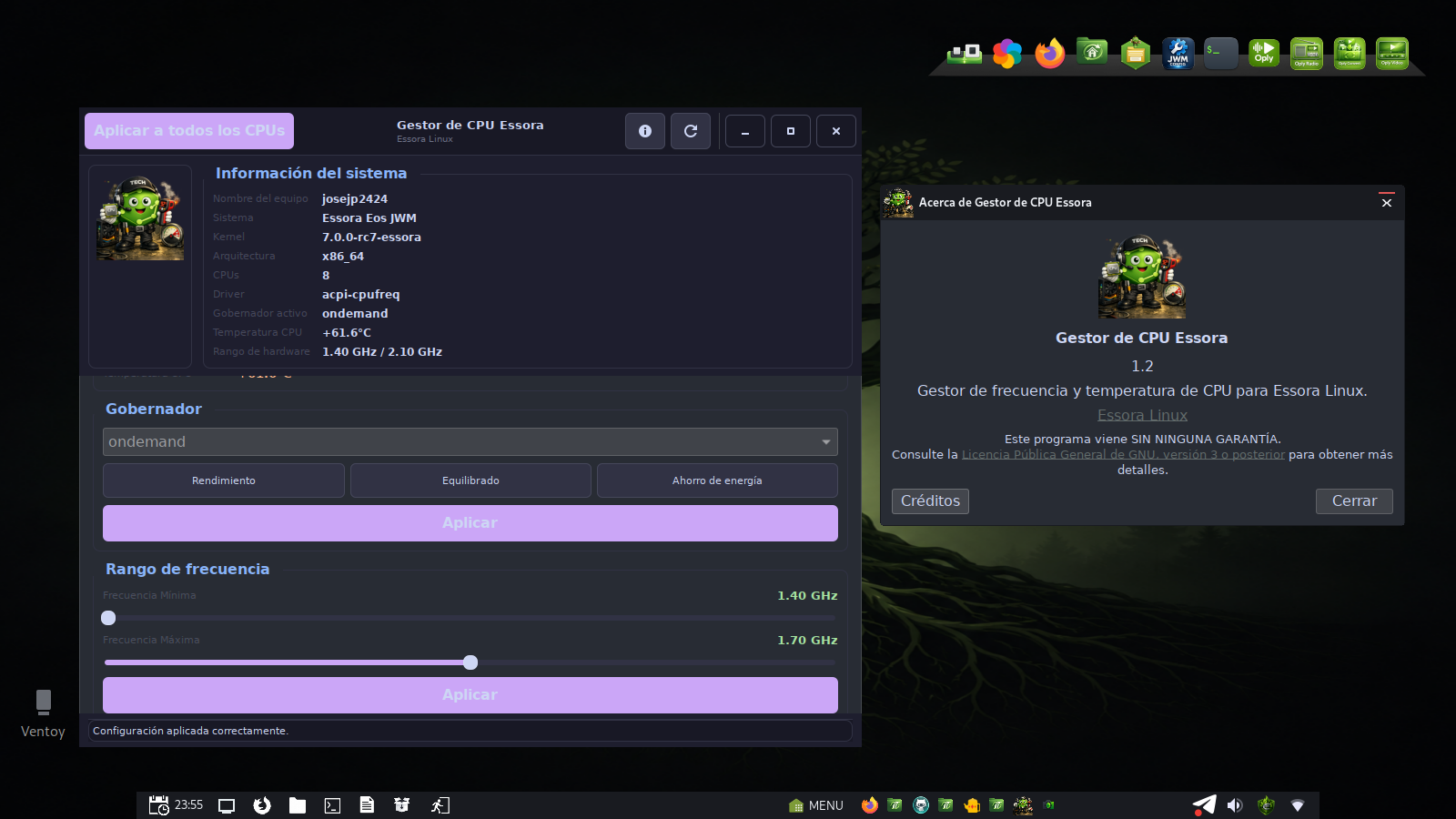
Essora CPUFreq, also known as Essora CPU Manager, is a GTK3 utility created for Essora Linux to monitor CPU temperature and manage CPU frequency scaling in real time.
It gives users direct control over CPU governors, current frequency information, minimum and maximum frequency limits, scaling drivers, hardware frequency range and per-core CPU status from a clean graphical interface.
Why Essora CPUFreq exists
Essora is designed to be lightweight, fast and controllable. CPU frequency management is an important part of that philosophy because it allows the user to choose between performance, energy saving or a balanced behavior depending on the hardware and the task.
Instead of forcing users to edit system files or run commands manually, Essora CPUFreq provides an integrated interface for viewing and applying CPU scaling settings directly from the desktop.
Main Features
Real-time CPU information
Shows current frequency, minimum and maximum frequency limits, scaling driver and active governor.
Temperature monitoring
Displays CPU temperature using lm-sensors support when available on the system.
Governor selection
Allows choosing governors such as performance, powersave and balanced modes.
Apply to all CPUs
Settings can be applied to a single CPU core or across all detected CPU cores.
System information
Displays hostname, system, kernel, architecture, CPU count and active governor information.
Essora integration
Designed to fit naturally into the Essora desktop environment and visual style.
CPU Control Modes
Essora CPUFreq exposes simple modes that are easy to understand:
- Performance — prioritizes maximum performance when the system needs power.
- Power Save — reduces frequency behavior to save energy and lower heat.
- Balanced — aims for a middle point between performance and efficiency.
These options make it useful for laptops, desktops, older machines and lightweight systems where temperature, battery usage and responsiveness matter.
How it works
The application reads CPU information from the Linux sysfs CPU interface:
/sys/devices/system/cpuIt then presents the available frequency and governor information in a graphical GTK3 window. When applying settings, root privileges may be required depending on the system configuration.
Multilingual Interface
Essora CPUFreq includes built-in translations and desktop file localization for multiple languages, including:
- English
- Spanish
- Arabic
- Catalan
- German
- French
- Italian
- Portuguese
- Hungarian
- Japanese
- Russian
- Chinese
Requirements
- Essora Linux or compatible Devuan-based system
- Python 3
- GTK3 / PyGObject
- lm-sensors
- CPU frequency scaling support enabled in the kernel
Installation
Install the package with:
sudo dpkg -i essora-cpufreq_1.2-1_amd64.debAfter installation, it appears in the system menu as Essora CPU Manager.
Final Words
Essora CPUFreq is a small but important part of the Essora ecosystem. It gives users practical control over CPU behavior while staying aligned with the Essora philosophy: lightweight tools, clear interfaces and full control over the system.