
Essora Installer
Graphical installation tool built specifically for Essora Linux
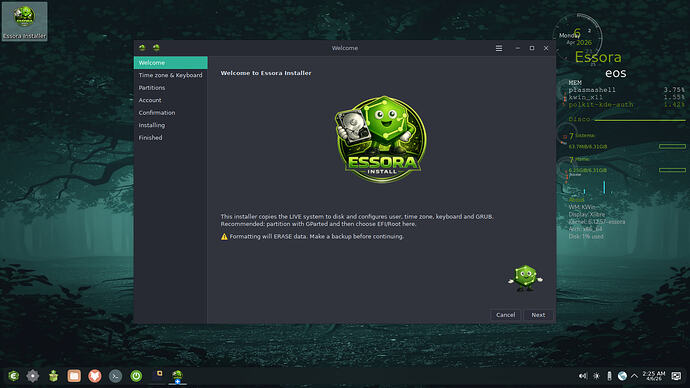
Essora Installer is the graphical installation tool built specifically for Essora Linux, a custom distribution based on Devuan with OpenRC as the init system.
It provides a clean, step-by-step wizard that guides the user through the entire installation process without requiring any command-line knowledge.
What it does
The installer copies the live system directly to disk using rsync,
then configures the installed system to be ready to use on first boot.
During the process it handles everything automatically: partitioning, filesystem formatting, GRUB bootloader installation for both BIOS and UEFI systems, user account creation, hostname, timezone, keyboard layout, and SLiM autologin configuration.
Key features
The wizard walks through clearly labeled pages:
- Welcome page
- Timezone and keyboard configuration
- Partition selection
- User account creation
- Confirmation summary
- Installation progress
- Finish page
It supports both manual partition selection and automatic whole-disk partitioning with EFI, swap and root created automatically.
Installation experience
During installation a banner slideshow runs on screen to keep the user informed that the process is ongoing.
Once installation completes, a finish page appears with the option to restart the system immediately.
BIOS and UEFI support
On UEFI systems, the installer correctly sets up the EFI partition, installs GRUB
with full fallback support, and generates a proper grub.cfg so the
system boots reliably on the first try.
At the end of the installation, live-only tools such as the installer itself are automatically removed from the installed system, keeping it clean and minimal.
Where to find it
Essora Installer is open source under the GPL-3.0 license and is available on the Essora Linux project page.