
EssoraKB
Graphical Kernel Builder for Essora Linux
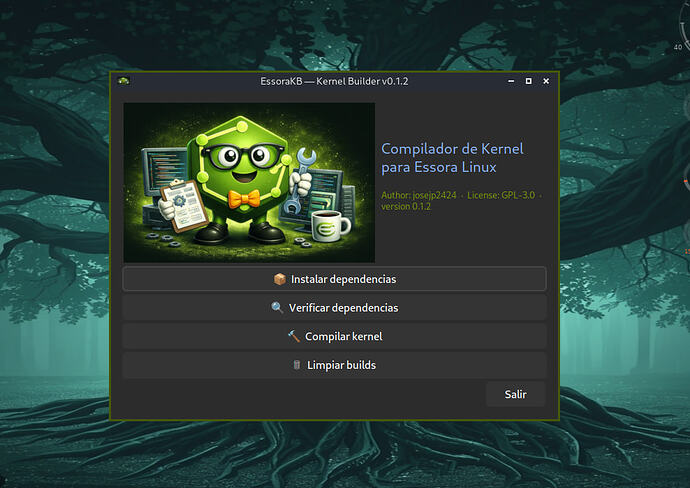
What is EssoraKB?
EssoraKB is a graphical frontend for compiling custom Linux kernels on Essora Linux, a Devuan-based distribution using OpenRC.
Instead of running dozens of commands manually, EssoraKB guides you through the entire process — from installing build dependencies to generating ready-to-install .deb packages — through a clean interface built with YAD.
The program includes pre-configured kernel profiles for x86_64, supports ccache for faster recompilation, and generates all four packages that a Debian-compatible system needs: linux-image, linux-headers, linux-kbuild and linux-libc-dev.
How to use it
The workflow is linear. Follow these steps in order.
Step 1 — Install dependencies
Click Install dependencies. A terminal window opens and runs the install-deps.sh script as root.
It installs all required packages across ten groups: kernel build tools, compilers, ccache, Python, GTK and Qt development libraries, and Debian packaging tools. This step only needs to be done once.
If you want to check what is already installed without installing anything, click Check dependencies instead. It runs the same script in verification mode and shows which packages are present and which are missing.
Step 2 — Build kernel
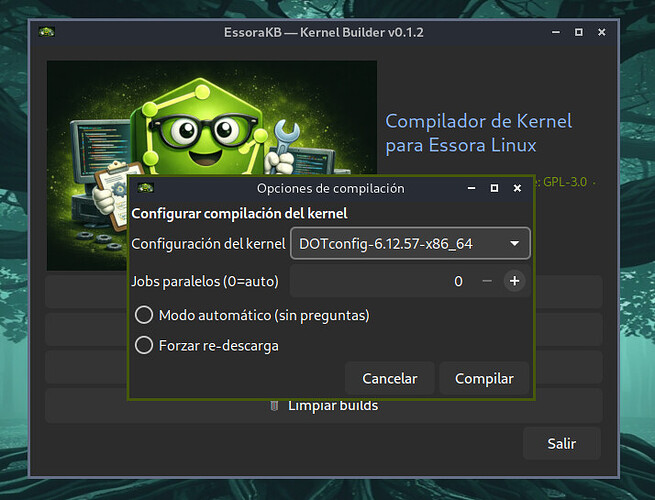
Click Build kernel. A dialog opens with the following options:
- Kernel configuration — a dropdown listing all available
DOTconfigprofiles shipped with EssoraKB, for exampleDOTconfig-6.12.57-x86_64orDOTconfig-7.0-rc7-x86_64. Select the version you want to compile. - Parallel jobs — number of CPU threads to use during compilation. Set to 0 to auto-detect via
nproc. - Automatic mode — controls how the kernel is configured before compiling.
- Force re-download — forces the kernel source tarball to be downloaded again even if it already exists locally.
Step 3 — Automatic mode vs interactive mode
This is the key choice before compilation starts.
If Automatic mode is checked:
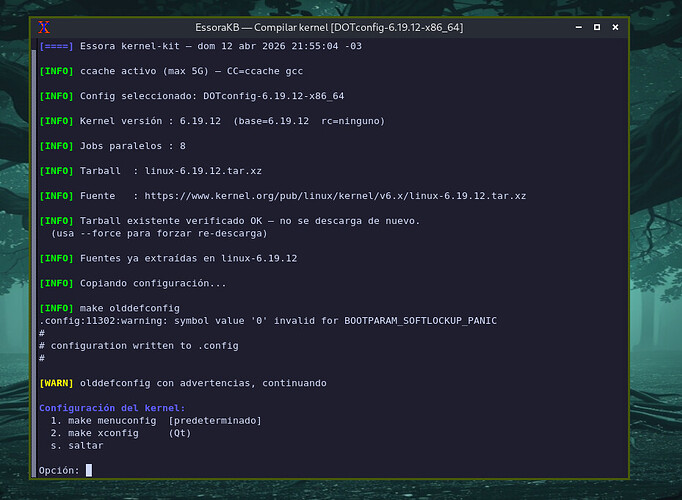
The build runs completely unattended. The script applies make olddefconfig to the selected DOTconfig and immediately starts compiling without asking any questions. Use this when you trust the configuration and just want the packages built.
If Automatic mode is unchecked:
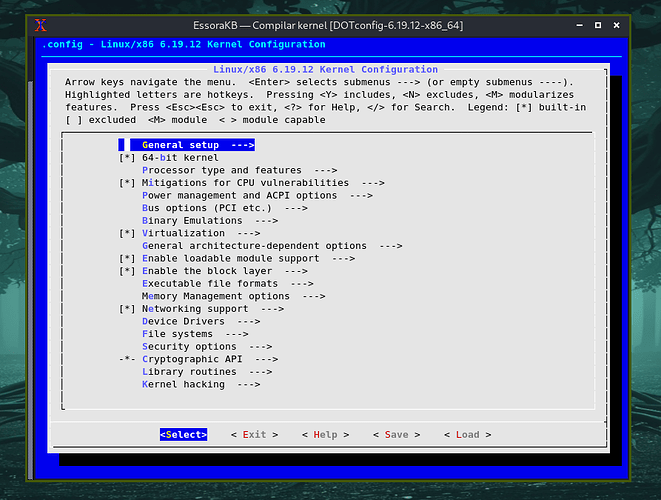
Before compiling, make menuconfig opens in the terminal. This is the standard Linux kernel configuration interface where you can browse and modify every option in the selected DOTconfig — enable or disable drivers, tweak the scheduler, add module support, change security settings, and so on.
Once you save and exit menuconfig, compilation begins automatically. Use this when you want to customize the configuration before building.
Step 4 — Collect the packages
When compilation finishes, all generated .deb packages are moved to:
/opt/EssoraKB/builds/out/<version>/
To install the new kernel:
sudo dpkg -i linux-image-*_amd64.deb linux-headers-*_amd64.deb linux-kbuild-*_amd64.deb linux-libc-dev_amd64.deb
sudo update-grub
Clean builds
The Clean builds option deletes the /opt/EssoraKB/builds/ and /opt/EssoraKB/builds/out/ directories along with the build log, freeing disk space after a successful installation.
Features
- Installs all 60+ build dependencies in one click, organized in ten groups
- Pre-configured DOTconfig profiles for stable and RC kernel versions
- ccache integration — recompilation is significantly faster on unchanged source files
- Two compilation modes: fully automatic or interactive via menuconfig
- Multilingual interface with automatic language detection via
$LANG: English, Spanish, French, German, Italian, Portuguese, Arabic, Catalan, Hungarian, Russian, Japanese and Chinese - Built-in YAD authentication dialog — no external gksu required
- Themed xterm terminal with Catppuccin Mocha colors for all output
- One-click build cleanup
Requirements
- Essora Linux, Devuan based
yadxtermxdotool
All kernel build dependencies are installed by the program itself.
Download
Download EssoraKB 0.1.2About
EssoraKB is part of the Essora Linux ecosystem, a collection of GTK3 and YAD-based tools built specifically for Essora Linux.
Source code and packages are available at SourceForge and GitHub.