
Lumivio
Screen capture and recording tool for Essora Linux
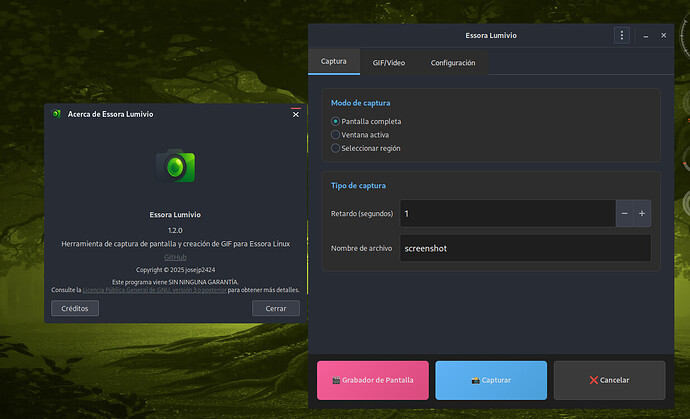
Lumivio is a screen capture and recording tool for Essora Linux, designed to handle screenshots, animated GIF creation, and desktop video recording in a simple GTK3 interface.
It combines everyday capture tasks with a built-in screen recorder, allowing users to create screenshots, GIFs, and videos without switching between multiple applications.
Overview
Lumivio is built for practical screen capture workflows on Essora Linux. It supports multiple capture modes, customizable output locations, and quick access to results.
The application also includes an integrated screen recorder with support for video recording, optional audio, and flexible output settings.
Features
- Screenshot capture in PNG format
- Full-screen capture
- Active window capture
- Region selection capture
- Animated GIF creation
- Desktop video recording
- Optional audio recording
- Output folder selection
- Preview and open actions after capture
- Lightweight GTK3 interface
- Multilingual support
- Integrated screen recorder
Recording Capabilities
- Adjustable video quality
- Frame rate selection
- Optional audio input
- Pause and resume recording
- Preview after recording
- Quick access to saved files
Dependencies
Lumivio uses system tools and libraries such as:
- Python 3
- GTK3 / PyGObject
- FFmpeg
- scrot
- slop
- x11-xserver-utils
- pulseaudio-utils
- alsa-utils
- xdg-utils
Installation
Install using:
sudo dpkg -i lumivio_1.2.0-1_amd64.deb
Notes
- Some features depend on FFmpeg and audio utilities
- Region capture requires compatible selection tools
- Audio recording depends on system configuration
About Essora
Lumivio is part of the Essora ecosystem, focused on lightweight tools, usability, and integration within the Essora Linux environment.
Source
The source code is available on GitHub.